Plugins
Levels
The levels plugin rewards users for being active in the server.
# Gaining XP
Eligible messages sent by users will gain a random whole-number amount of XP. By default, the amount is between 7 and 13 per message. When a user gains XP for a message, that user will be put on cooldown and will not be able to gain XP for one minute.
Messages are eligible for XP if they meet all the following conditions:
- The message is sent by a human
- The message is in a server
- The message is either a regular message or a reply to another message
- The message does not start with a common bot prefix
- The message length is over 3 characters
Ineligible messages will not gain XP and will not cause the author to be put on cooldown.
# Voice XP
Voice XP is an Atlas Prime feature. Atlas checks who is eligible to gain XP for voice activity once per minute. Members need to stay eligible for the whole minute to earn its XP, so joining, leaving, moving channel, or changing mute/deafen status partway through a minute will not earn partial XP.
Atlas ignores bots, members in the server AFK channel, muted or deafened members, and Stage listeners who cannot speak. Plugin restrictions also apply to voice XP: members cannot earn voice XP in blacklisted channels, or in channels and roles that do not meet a whitelist restriction.
Each voice channel must have the configured number of eligible members. For example, with a minimum of two, two eligible members must stay in the same channel for the whole minute. Setting the minimum and maximum XP to the same value awards fixed XP. Otherwise Atlas chooses a whole number in that range. Everyone who earns XP in a minute receives the same amount.
Level-up roles and notifications may appear shortly after the XP is awarded rather than immediately. Notifications normally use the voice or Stage channel's text chat, but are skipped if Atlas cannot use it. A configured notification channel or direct-message setting still takes precedence.
# Level-up Message
Level-up messages are sent when a user moves from one level to another. Tags are supported in the level-up message content. If the direct-message option is set, the message will be sent to the user and will fall back to the channel the user levelled up in if the direct-message fails (for example, if the user has their direct-messages closed). Read Scripts for an introduction, and see the user tags for values such as a member's level and XP.
For example, this sends an embed when someone reaches a new level:
{responder.embed title="Level up!" description="{user.mention} reached level {user.level}."}
# Rewards
Level rewards are roles that are given to users at specific levels.
The stack option for level rewards will mean that once the user achieves that level, they keep the reward even after they level up. Disabling stacking will remove the role once they level up, unless there is no role left to give.
The once option for level rewards will mean that the user will only get the reward once, even if they level down and then level up again or it was removed from them manually.
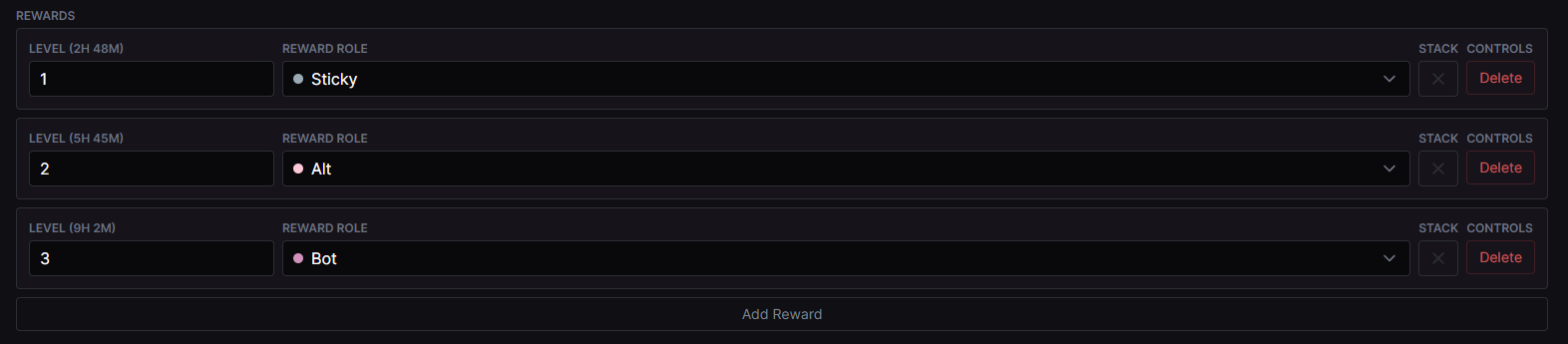
Given this example
- At level 1, the user will get the "Sticky" role
- At level 2, the user will get the "Alt" role and the "Sticky" role will be removed
- At level 3, the "Alt" role will be removed and the "Bot" role will be added.
- At level 4, the user will keep the "Bot" role from level 3, even though it is not set to stack.
# Preventing users from gaining XP
Plugin restrictions apply to gaining XP. If a channel is blacklisted, that channel cannot be used to gain XP.
# Resetting levels when a member leaves
By default, a member keeps their XP and level if they leave. Atlas restores eligible rewards when they rejoin. "Reset Levels on Leave" removes that member's stored XP, message count, and level when they leave or rejoin.
# Level Curves
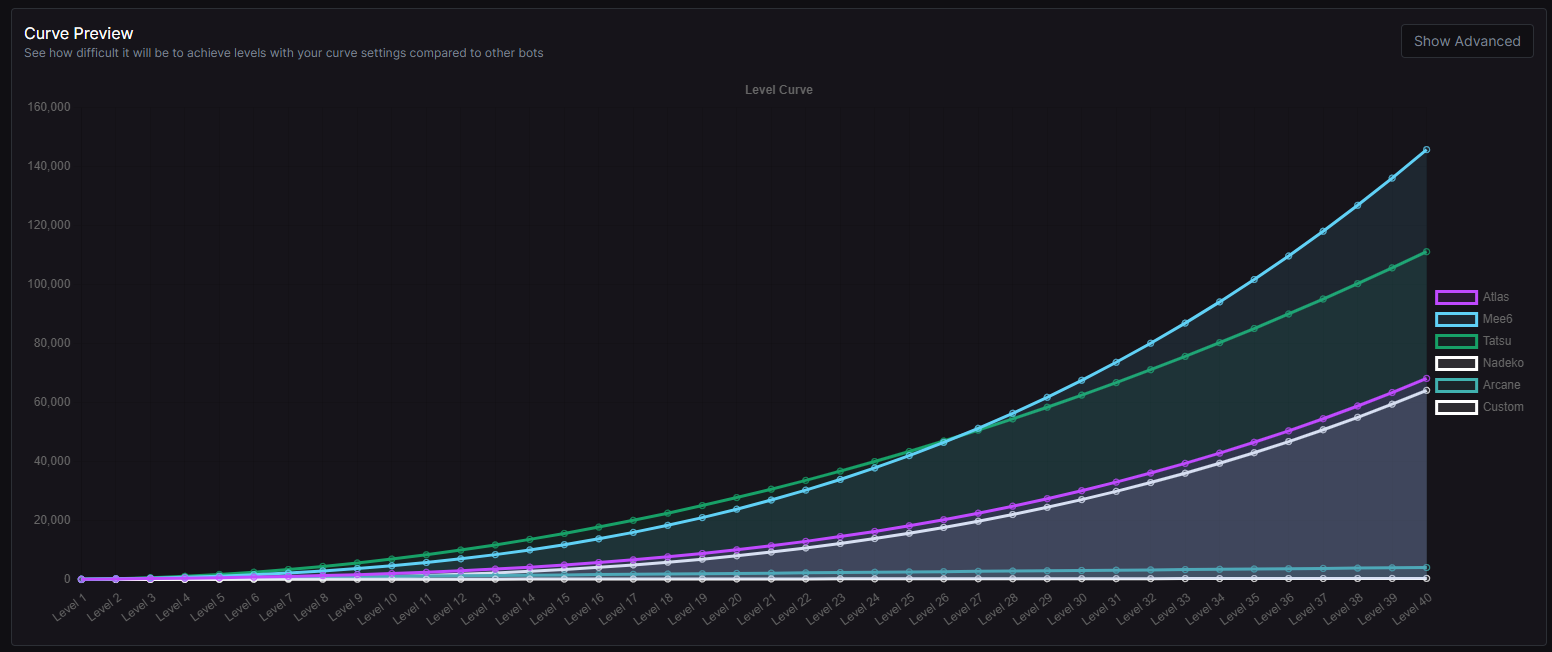
Level curves are an Atlas Prime feature that can be used to to make it easier or harder to level-up. The expression is used to convert a users XP into their level. If you open the curve preview, you can see how your custom level compares to other bots and the default level curve.
Changing the level curve will apply to all users immediately and retroactively. Because the level is calculated based on the users XP, changing the level curve will change the level of existing users.
Level rewards are not adjusted when you change the level curve.

# Level Sync Mode
The sync mode determines when level rewards are synced with the user. By default it's set to "on level up", which will only sync roles when the user levels up. This is the recommended mode, and means you can remove roles from users without the bot adding them back the second they send a message. The other mode is "on xp gain", which will sync their levels when the user gains XP by sending a message. You should only use this mode if you have a good reason to.